Month: October 2011
Mom: Interview I – RealAcad Mondays
Over the next many weeks, months and years, I hope to continue this feature with an interview every fortnight (or even weekly if we can manage it!) from people who inspire me/other RealAcaders/you (if you are up for it!). I think it would make for a phenomenal learning experience understanding what drives people who inspire us.
To get the ball rolling, I have here an interview with Mrs.Swapna Nair (better known on this blog as ‘Mom’).
An Introduction:
Of all the people who have inspired me in my life, my mom has ‘tenure’ of sorts. Aside from the tiny detail that she’s the first person I ‘met’ on this planet and the other tiny detail that she got me started on my journey here, she has been a source of continuing inspiration.
She has always taken what she has done to a whole new level. As a teacher, she was consistently chosen as among the city’s, the state’s and the nation’s leading teachers giving her opportunities to visit the United States and Singapore on various programs. In fact, it was after her 1st program thanks to which she spent a month in California that she decided that I should study make it a point to study abroad and get exposed. And, thanks to her push, I did.
Aside from being a teaching superstar, she is, in my mind atleast, the true traveler. There may be many who have traveled to many more new lands, but few I know match her curiosity, openness to culture, love of history and love of new cuisine. The biggest lesson I’ve learnt from my Mom is her openness. The adage ‘The purpose of education is to replace an empty mind with an open one’ is one she epitomizes. Forever open to trying new things and new technology, she is now at home with an Android phone (soon to be converted to iOS :)), an iPad and has her own blog as well. Probably most importantly, she has always been comfortable around people who know more than her because she is the ideal student in many ways – always eager to absorb and forever humble. It’s that quality that makes her the outstanding teacher that she is.
An amazing storyteller, a great poet, a very passionate person with a great sense of humor, she has been adding joy and learning to the lives of her students for 22 years now. And all the while, she has been a fantastic mother who lead our family through some very dark moments and also been an extremely cool Mom and friend to all my close friends as well. Quite a person, quite a story.
I feel it is fitting that we begin this interview with a teacher – for it is a profession that truly deserves the highest respect.
And like everything else, her answers to my 3 questions touched me. Thanks Mom, for..everything.
—
1. What energizes/inspires you?
Each day as I enter the school I work in, I am energized. The eager faces of my students, the challenges awaiting me boost my energy levels. Each day is different. The experience of teaching the same subject to different groups is amazingly different and varied. The challenge of accepting each child as he or she is adrenaline to me. Each mind is an enigma. Each little heart holds abundant treasure. I feel so magical when I am in their presence.
2. Looking back, what has been the most defining experience in your life?
The most defining moment in my life is definitely the birth of my son. When I held him first a new vein of life surged through me. I was born again, in a new role,. The role of a lifetime, being a mother! Every moment has been a poetic journey so far. The roles have reversed. Today he is my mentor. I am once again in a new role, his disciple.
3. What is your advice to leaders who will be reading this?
My passion is teaching and every waking moment I decide to be the most inspiring teacher. Each day I learn something new. This excites me. I have realized that to ‘learn’ we must be like a sponge ready to absorb. Some may be positive while some maybe negative, nevertheless it is ‘learning’. Learning can come from anybody. It may be from a child, a colleague, the the elevator guy, a vendor….
Somewhere, sometime the learning will come of use.
Leadership is also often about delegation of work. This builds the team. If every leader can nurture and train future leaders, it is the sign of positive leadership.
A doctor cures, an engineer builds, a trainer trains, a teacher teaches while a leader inspires!!!
—
Looking forward to your thoughts and feedback on the first edition of ‘RealAcad Mondays’ in the comments. I am hopeful these will become 5-10 minute video clips in the future. One step at a time, though. :)
—
More on RealAcad Mondays
On Muhammad Ali and Sylvester Stallone
On March 24, 1975, underdog Chuck Wepner took on World Heavyweight Champion Muhammad Ali.
The fight was legendary – Wepner lasted 15 rounds with Muhammad Ali almost knocking him out in the process. Eventually, he was knocked out in round 15 with 19 seconds to go.
Over a 1000 miles away, struggling actor Sylvester Stallone was very inspired by Wepner’s effort as an underdog fighter. So, he began writing the script for a story with him as the underdog boxer, Rocky. The rest, as they say, is history.
On hearing this story, I was reminded of a friend who responded to the 2008 oil crisis (when the oil price went down to $40 per gallon) by buying 600,000 gallons of oil (!). While the rest of the world was busy reading newspapers, he saw an opportunity. Two years later, the oil price was back to $120 per gallon. He sold it at 300%.
Millions watched the Ali-Wepner fight on television but one man decided to use it to catapult his struggling acting career to a million dollar one.
The point I am trying to make here is that we have ‘stimulus’ all around us that could inspire us to no end. The big question is if our minds are open to it.
Here’s to seeking inspiration from events around us this week!
A Touch of Geekery: Super-charging Your Outlook with Folder Sort
Thanks to Microsoft Office’s dominance, it is likely that you are using Outlook at work, at school or have even begun using it for your personal email.
As many of you know, I am a big Outlook Fan. I have discussed my love for Outlook before. I think one of my biggest learnings when it comes to Outlook is the difference knowledge of it’s features makes. Using Outlook’s ‘Rules’ alone, you can become a ‘no-spam-ninja’ within a month, delay sending emails so you avoid BSAK errors among others.
And then, you can take it to the next level by using Macros. A macro I have blogged about before is the ‘Never forget an attachment again’, a 1 step process that will alert you every time you say ‘attach/attached’ in an email and forget the attachment. (In a hurry, you may still miss this! But well, it helps 80% of the time.. :))
That brings me to the purpose of this post – to present to you – ‘The coolest simple Macro of them all’ – the FolderSort macro.
If you are using Outlook, you probably have folders to transfer emails into after you have read them. And most likely, you are dragging and dropping them into these folders which, over time, is a massive productive drain.
And thanks to this genius macro, I have not had to do any dragging and dropping for over 3 years now. It is a 5 step process and will work well for you. All you have to do is follow the process and you are a comment away if you have any questions of course.
Essentially, it’s 10 minutes of investment now or 100s of minutes of lost time dragging and dropping emails.
Before you begin, here’s what success will look like (screenshot from my own Outlook)
(The second is zoomed in).
Essentially, what we are going to do is make these buttons – 1 for every folder that you have on your Outlook.
Step 1 – Copy the Macro from here and copy the code. (The significance of the red is mentioned in the steps below)
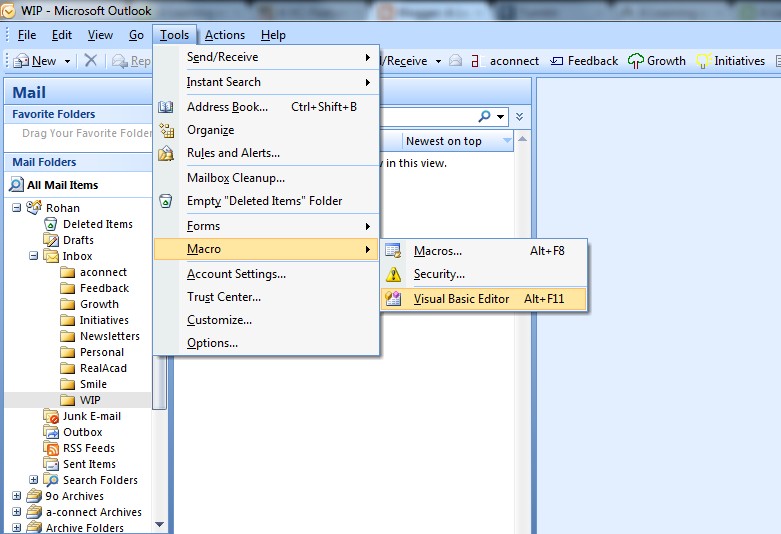
Step 2 – Go to Tools -> Macro -> Visual Basic Editor
Step 3 – Copy the code into the window (on the left, might have to open up the ‘Project 1…’ till you get to ‘ThisOutlookSession’. the copied code will look like this.
Step 4 – Replace the red folder names with your real folder names
A small note here – please keep your folder name to 1 word to keep the code simple i.e. no ‘Personal Emails’ – just ‘Personal’.
If you would like 5 such buttons, just copy it 5 times and change the folder names accordingly.
Step 5 – You are essentially done. All you need to do is put it up on your Toolbar.
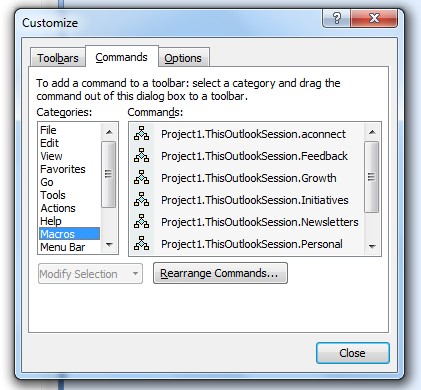
Right click anywhere on your toolbar and click on Customize
Just drag it onto your toolbar and voila your button is ready! Now you can customize it all you want.. Right clicking it will give you many options. You can change the name, edit the button image (as you can see, I have little colored images on mine)
This is as simple as it looks. As always, your questions are very welcome in the comments.
And of course, if you do decided to give this a shot and get these installed, do share your experience too!
—
This post is thanks to a certain Donna, from the community at AVC who asked for the Outlook macros. I hope you all find it useful.